Your Health Department Exposed: The Hidden Work Protecting Everything You Eat, Breathe, and Touch
When a restaurant falls ill with a foodborne outbreak or a community faces a sudden disease cluster, the health department is the first line of defense. It operates by investigating threats, tracing sources of contamination, and deploying rapid containment protocols to stop spread before it escalates. Its core benefit is protecting everyday well-being through disease surveillance and public health guidance that keeps neighborhoods safer. To use it, residents can report suspicious symptoms, access testing services, or seek preventive advice directly from their local health department office.
What Does a Local Health Agency Actually Do for You?
Your local health department is the hands-on safety net for everyday well-being, working quietly to keep you healthy without you even noticing. It’s the team that tracks contagious diseases, so if a stomach bug or measles case appears, they trace it and alert you quickly to stop it spreading. They also run free vaccination clinics for kids and adults, protecting your family from preventable outbreaks. When you eat out, their inspectors check restaurant kitchens for hygiene, and they test public pools for water safety. They provide support for new parents, from home visits to lactation advice, and offer low-cost testing for STIs or lead exposure. During a crisis like a flood or heatwave, they coordinate cooling centers and drinking water safety. One huge benefit is that most services are free or sliding-scale, so your tax dollars come back as direct, local protection.
Core Services You Can Access Right Now
Your local health department’s core services you can access right now are designed for immediate, practical help. Walk in for immunizations, from flu shots to routine childhood vaccines, often at low or no cost. Need testing? Many sites offer same-day STD and HIV screening, plus free pregnancy tests. You can also grab naloxone kits, pick up free condoms, or get tuberculosis skin tests without an appointment. For food and water safety questions, call their hotline for real-time answers on recalls or safe handling. Here’s how to use them:
- Check your county website for walk-in hours.
- Bring your ID and insurance card (if you have one).
- Ask about sliding-scale fees for any service.
That’s it—no waiting lists, just direct access to protective care today.
How Its Disease Tracking Keeps Your Neighborhood Safer
Your local health department’s disease tracking acts as a silent early-warning net for your block. When a cluster of flu-like cases or foodborne illness appears, analysts map the zip codes to spot the source—like a contaminated deli or a school outbreak—within days, not weeks. This data drives targeted alerts to nearby clinics and prompts rapid testing at your pharmacy. It also detects unusual upticks in vector-borne diseases, such as Lyme or West Nile, so officials can spray or post warnings before you’re bitten. By continuously aggregating anonymous test results, the system flags hidden chains of transmission, letting you adjust habits with confidence. Simply put, neighborhood-level outbreak surveillance translates raw numbers into protective actions for your street.
Q: How does disease tracking keep my neighborhood safer?
A: It identifies local infection hotspots instantly, enabling swift quarantine guidance, targeted sanitation, and vaccination drives before the illness spreads door-to-door.
The Difference Between State, County, and City Public Health Offices
State, county, and city public health offices form a layered safety net, each with distinct duties. The state health department sets broad policies, manages statewide disease surveillance, and runs laboratories that confirm outbreaks. County offices operationalize those policies by coordinating immunizations, restaurant inspections, and contact tracing across unincorporated areas and smaller towns. City health departments drill down further, handling dense urban challenges like lead poisoning screenings, local outbreak response in schools, and sanitation complaints in apartment complexes. If you call about a rabid raccoon, that’s your city; if you need a birth certificate, that’s the state; your county decides if a new housing development gets a safe water supply. Knowing the correct layer saves you time and gets you the right service faster.
How to Get Services and Records Fast
To get health department services and records fast, go digital before you go in person. Most departments offer patient portals where you can request immunization records, test results, and birth certificates instantly. Call your specific county office at opening time to confirm what’s available online—many let you download PDFs without a visit. For in-person services like STD testing or travel vaccines, book the earliest same-day appointment online and complete pre-visit forms in advance. If you need records for a deadline, request them electronically and ask for a “rush” status; staff can often email or fax within hours.
Never wait in line—the portal or a phone call is often faster than the front desk for both services and records.
Bring ID and any prior paperwork to avoid verification delays, and always verify your exact location, since city and county offices differ in speed and availability.
Step-by-Step: Requesting Birth, Death, or Immunization Records
To request vital records, begin by visiting your local health department’s website to confirm accepted forms of identification and payment. For birth or death certificates, download the application, complete it with the registrant’s full name, date, and county of event, then submit it in person or by mail with a notarized signature. For immunization records, contact the county clinic where you were vaccinated, or check your state’s immunization registry portal if available—many allow instant PDF downloads. Always carry a government-issued ID, and note that processing varies: birth records often take 3–5 business days, while state-level death certificates may require 2–4 weeks. For expedited service, select rush delivery at checkout. Verify record eligibility requirements beforehand to avoid delays.
Booking Appointments for Vaccines, Screenings, and Tests
Booking appointments for vaccines, screenings, and tests through the health department typically requires using its online patient portal or calling the designated scheduling line during business hours. Streamlined scheduling for vaccines, screenings, and tests often groups services by type, so you can select a single time slot for multiple eligible items, such as a flu shot plus a blood pressure check. Confirm your insurance or eligibility documents before booking to avoid rescheduling delays. Walk-in slots are rare for these services, so pre-booking is the only reliable path to timely results. After booking, you receive a confirmation number and reminder texts. Q: Can I book a vaccine and a screening for the same day? A: Yes, if both are listed under the same appointment category, but verify availability for combined slots.

What Documents or IDs to Bring for In-Person Visits
To avoid delays at the health department, bring a government-issued photo ID, such as a driver’s license, state ID, or passport. For browncountyhealthdept.org services involving a minor’s records or immunizations, carry the child’s birth certificate and your own ID to prove guardianship. If you are picking up test results or referral forms, also bring the original visit summary or appointment letter. Some locations require a separate proof of address, like a utility bill, even if your ID lists your current street. For a smooth transaction, follow this sequence: first, confirm your appointment type; second, gather ID, proof of address, and any prior medical records; third, arrive with all originals—not photocopies—unless the office specifically states otherwise.
Key Benefits You Might Be Overlooking
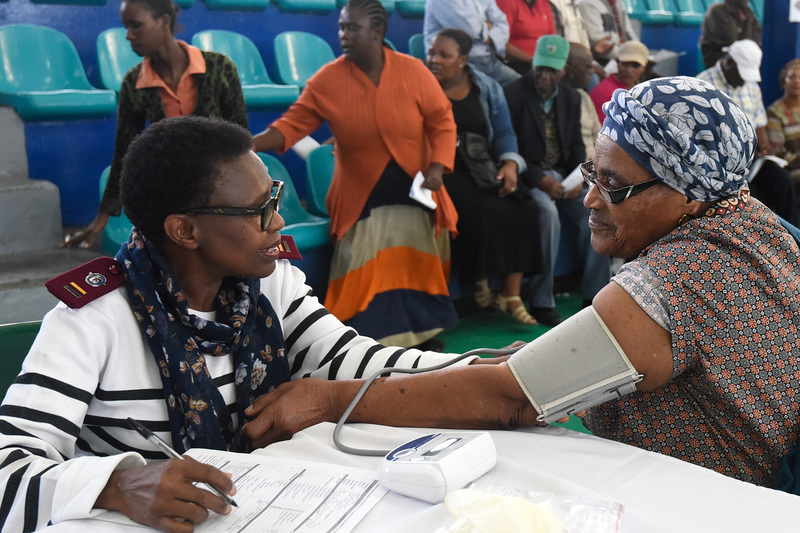
One overlooked benefit of your local health department is its role as a free, impartial **data source for community health trends**. Instead of relying on anecdotal reports, you can access localized maps of disease outbreaks or environmental hazards, which helps you make proactive decisions about your family’s activities. Additionally, many departments offer preventative screenings for conditions like hypertension or lead exposure that are rarely advertised. These services are often income-based or completely free, yet they can catch issues long before they become serious. Finally, the health department acts as a quiet mediator for landlord-tenant disputes over mold or pest infestations, providing official inspections that protect your rights without requiring costly legal action. These quiet, direct services deliver practical protection you won’t hear about through standard announcements.

Free or Low-Cost Clinics for Uninsured Residents
Many overlook that your local health department directly operates or partners with free or low-cost clinics for uninsured residents, offering sliding-scale fees based solely on household income. These clinics provide essential primary care, chronic disease management, and preventive screenings without requiring proof of immigration status or employment. You can often access lab work, basic medications, and referrals to specialists at a fraction of private costs. Appointments are typically prioritized for uninsured individuals, and walk-in hours exist for urgent needs. This is a practical safety net that prevents avoidable emergency room visits.
- Fees are calculated using federal poverty guidelines; a visit may cost as little as $0–$20.
- Prescription assistance programs and discounted generic medications are available on-site.
- Dental, vision, and mental health services are frequently included at no extra charge.
- Eligibility requires only a photo ID and proof of local residency, not insurance cards.
Sliding-scale payment structures ensure that even zero-income households receive full care, with no hidden billing later.
Restaurant Inspection Scores and Food Safety Alerts
Checking **restaurant inspection scores and food safety alerts** before dining out turns the health department into your personal food-safety watchdog. A single score reveals how rigorously a kitchen handles cross-contamination, temperature control, and hygiene—far beyond what a menu promises. Alerts flag active outbreaks, repeated violations, or sudden closures, letting you avoid risky spots before you order. Pairing the score with the latest alert history gives you a real-time picture of current conditions, not just a snapshot from months ago. Proactive review of restaurant inspection scores and food safety alerts can prevent a ruined evening or a serious illness. Q: How often should I check restaurant inspection scores and food safety alerts? A: Check once a week for your frequent spots, and always within 24 hours of trying a new restaurant—especially if you’re immunocompromised or dining with children.
Emergency Preparedness Plans and Local Alert Sign-Ups

Your local health department maintains emergency preparedness plans and local alert sign-ups that function as a direct, personalized safety net. By enrolling, you receive time-sensitive guidance on sheltering, water purification, and medication continuity during outages or contamination events—information tailored to your zip code’s specific hazards, not generic advice. These systems also coordinate with nearby clinics to flag service closures or alternate care sites before you need them. The sign-up process typically takes under five minutes and requires only an address and preferred contact method. Once registered, you gain a structural advantage: alerts arrive ahead of public broadcasts, giving you a decision-making buffer. This is passive protection that becomes active only when you opt in.
- Receive real-time notifications for boil-water advisories, heat emergencies, or chemical spills in your immediate radius.
- Access pre-vetted family readiness checklists that align with your health department’s specific response protocols.
- Get instructions for emergency medication refills or dialysis center relocations during declared local disasters.
How to Navigate Its Website and Phone System Efficiently
To navigate the health department’s site fast, land on the homepage and use the **top search bar** with precise terms like “birth certificate” or “STD clinic hours,” then filter results by “Services” rather than scrolling through news. For phone systems, call the main number and immediately press the key for “Operator” or say “agent” to bypass lengthy menus. Avoid peak hours (Monday mornings, lunchtimes) and have your ZIP code, date of birth, and insurance card ready—the automated system often verifies these before routing you. Q: What’s the quickest way to reach a human? A: Say “billing question” repeatedly, as that line has the shortest queue in most counties. If the website’s appointment portal glitches, use the “call me back” feature on the contact page instead of waiting on hold.
Finding the Right Department or Caseworker on Your First Call
To reach the correct health department staff on your first call, begin by identifying the primary service you need—immunizations, WIC, environmental health, or vital records—then consult the department’s online directory or its automated phone menu’s “programs” branch. When unsure, press “0” or say “operator” to speak with a live receptionist, and state your need in one clear sentence, including your zip code if you live outside the main service area. First-call caseworker routing often depends on your address and the specific program’s intake line. If the menu offers a direct extension, write it down immediately. For follow-up care, ask for the caseworker’s direct line and email, and confirm their available hours before hanging up. Use the following sequence:
- List your exact service need and your address.
- Call the main number and select “programs” or ask the operator.
- If transferred, repeat your need and request the caseworker’s direct contact info.
Using Online Portals for Forms, Payments, and Renewals
For the health department, online portals streamline routine transactions, consolidating form submissions, payment processing, and renewal tracking into a single dashboard. Before starting, verify your account details and keep your jurisdiction’s portal URL bookmarked, as many departments use separate subdomains for environmental health versus vital records. When paying for permits or certificates, select the correct fee category from dropdown menus to avoid processing delays; receipts are typically downloadable immediately. For renewals, enable automatic reminders in your profile settings, and upload required documents (e.g., proof of inspection) in accepted PDF formats. If a form fails to save, refresh the page and check your internet connection before retrying. Always confirm submission by locating the confirmation number—if absent, your request was not recorded.
Q: What should I do if a renewal payment portal times out mid-transaction?
A: Do not resubmit immediately. Return to your dashboard, check recent transactions, and contact the portal’s support line with your timestamp; most systems hold pending payments for 15 minutes, and duplicate charges can be manually reversed within five business days.
Translation and Accessibility Options for Non-English Speakers
For non-English speakers, the health department’s site and phone line include built-in translation and accessibility options to avoid frustrating dead ends. On the website, look for a globe icon or language dropdown—usually at the top right—to switch entire pages into Spanish, Mandarin, Vietnamese, and other common tongues instantly. If you call the main number, press the language line (often “9” for interpreters) to get a live translator for your specific issue, not just a robotic menu. For in-person visits, ask for translated forms or a remote video interpreter at the front desk. These tools help you file reports, book appointments, or ask questions without needing English fluency.
- Use the site’s “Translate” button to change forms and alerts into your preferred language.
- On phone menus, choose the language option or say your language name to skip ahead.
- Request a free over-the-phone interpreter during any call—do not rely on a bilingual friend.
- Print or download translated material guides (e.g., immunizations, WIC) before your visit.
Common Pitfalls and Smart Tips for Dealing With the Agency
Treating the health department like an adversary is your first misstep—they are process-driven, not out to get you. The biggest pitfall is submitting incomplete paperwork, which halts everything; smart negotiation tactics begin with triple-checking every form for missing signatures or unclear diagrams. Don’t demand exceptions on your timeline; instead, ask precisely what triggers a deferral and which fixes carry the most weight for approval. A common trap is ignoring the initial walkthrough notes, then being shocked by a re-inspection. Smart operators photograph every correction they make and create a digital log to show immediate compliance. Finally, never argue a violation without first asking for the specific code reference—this shifts the tone from conflict to collaboration and speeds up your final sign-off.
Why Your Request Gets Delayed and How to Avoid It
Most delays at the health department happen because your packet is incomplete or forms are signed in the wrong place. They won’t call you to fix it—they’ll just set it aside. Another big stall? Sending requests right before a holiday or Friday afternoon, when staffing is thin. To dodge this, double-check every box, attach all required records, and use their online portal if available—it timestamps your submission. Following up politely after five business days also moves you up the queue. The trick is making their review effortless, so they don’t have to pause and chase you down. Proactive submission with a checklist is your best shield against silent waiting.
Delays stem from incomplete paperwork and bad timing; avoid them by prep-checking documents, submitting mid-week, and following up once.
When to Contact Them vs. Your Doctor or Hospital
Contact the health department for outbreak tracking, foodborne illness reports, or public health guidance—not for individual medical care. If you have chest pain, difficulty breathing, or severe allergic reactions, call emergency services or your doctor immediately. The health department lacks diagnostic tools and treatment protocols; they handle population-level concerns like quarantine orders or vaccination clinics. For chronic condition management or medication adjustments, always prioritize your physician. Know the boundary between public health and clinical care to avoid delays. Urgent symptoms belong to hospitals. Use the health department for environmental hazards, communicable disease exposure, or immunization records. Q: When should I contact the health department instead of my doctor? A: Only for community health issues—like suspected food poisoning from a restaurant—never for personal medical emergencies.
How to File a Complaint or Report a Public Health Hazard
Before you dial, snap a photo or jot down the exact address—this makes filing a complaint way smoother. Start by calling the health department’s main line and ask for the environmental health division; they handle hazards like mold, sewage, or food safety issues. If the problem is urgent (like raw sewage leaking), say “immediate health risk” so they prioritize it. You can usually file anonymously, but giving your contact info helps them follow up with you. **Your written record is your best friend**—keep timestamps and any correspondence. They must respond within a set timeframe, so if you hear nothing in a week, nudge them politely. Q: **How do I report a health hazard if I’m not the property owner?** A: You absolutely can—just state your role (tenant, neighbor, passerby) and the hazard’s location; they don’t need your name, only the site’s details.
